Sign in below to join the discussion and then click Allow Access
-
7AndreasSZ 8 years ago
Nice roundup. If you are using Mac I would like to recommend Laravel Valet which works great with WordPress. https://laravel.com/docs/5.5/valet
-
Whitney Krape 8 years ago
Longtime Laravel user and didn't know about that, thanks for sharing!
-
Pete Hegman 8 years ago
Can't recommend Laravel Valet enough! I wrote an article a little while ago about integrating Laravel tools into WP development that should help anybody get up and running with Valet. https://medium.com/@petehegman/my-wordpress-dev-setup-using-laravel-tools-to-improve-your-wordpress-development-f1b08de02d3d
-
Joey English 8 years ago
Also a big proponent of Valet; I was tethered to MAMP for several years, and finally decided to cut the chord (so to speak) a couple of years ago. I've had far fewer issues and have much deeper control over my local environment without MAMP adding its complexities for the sake of simplicity -- something that I no longer require.
-
Qiang Lu 7 years ago
I switched from MAMP to Laravel Valet directly and I am so glad I did it. Laravel Valet is such a neat command line software to use in the Mac environment. I kept getting errors due to unknown causes in config.php while using MAMP. After wasted several days' of trying, found this review. I knew there are always some good comments after a review. So kept reading and among the comments, I focused on Laravel Valet and Local by flywheel. Finally choose Laravel Valet, only because I used Homebrew before. There were some issues when installing LV due to the old version of Macport and Homebrew. The issues were gong after deleted Macport and reinstalled Homebrew. With several command lines, I installed LV and successfully cloned a website alive to local using Duplicator. The whole process is just about an hour. I have to say LV is such a cool, free, simple, thin, yet powerful software (wraper). Cannot recommend it enough. It's like I am driving an easily controlled manual car now. Strongly suggest Jeff adding review of LV for Mac as well.
-
-
Qiang Lu 7 years ago
Are you the Author of Laravel Valet?
-
Seagyn Davis 7 years ago
No. Just a fan/user like you are.
-
-
-
-
-
jfarsen 8 years ago
Loved the review, and more importantly your sense of humor (we're all too serious sometimes). I've used all of these for years, and like you favored MAMP Pro, but warming to Local, because... woah ... have you *seen* ALL those tech specs on that download page... :)
-
Dustin 8 years ago
On Windows, Laragon is pretty amazing. It has a GUI for installing WordPress as well as lots of other software. It automatically creates virtual hosts, allows you to send & catch test emails, and switch versions of PHP / Apache / MySQL easily. It creates an isolated environment with many things already installed and available via command line: Git, Node.js, NPM, SSH, xDebug, Composer, etc. Definitely worth a look.. https://laragon.org/
-
1smcrtv 8 years ago
Thanks for the rundown, I'd gone from WAMP, to XAMPP, to MAMP, to VirtualBox, to Vagrant/VB, to Docker, and now Homebrew services (nginx, mariadb, php) on my mac has been pretty turnkey for getting all these things running. Sequel Pro for MySQL gui, and over the years I've gotten used to editing nginx/apache server configs. It's the fastest of all the options performance-wise, but if you need true point-and-click, there are great options here.
-
Monte 8 years ago
Agreed, excellent rundown however I'm running the same setup as smcrtv. I had been working with MAMP Pro for years, but wanted something that gave me more control and found a great post on setting up the whole gamut via Homebrew. I also enjoy being able to switch PHP versions on the fly when necessary and not having to pay for MAMP PRO. This setup has actually made me better at understanding the complexities of the server and therefore helped me in my development path. If anyone is interested in a great run down of how to set it up, I recommend it: https://getgrav.org/blog/macos-sierra-apache-multiple-php-versions
-
-
coccoinomane 8 years ago
Thanks for the nice reviews! We use Local at our agency and we are very satsified! We heard that Flywheel is working on a paid Pro version... unless it's 5k a copy, we shal definitely buy it ;-) By the way, have you ever tried Kalabox? It's a Docker environment working on Mac, Linux & Windows. I tried it a year ago but it was still too immature, now apparently they are releasing a 3.0 version (called Lando) so maybe it's time to give it another try...
-
2boldfish 8 years ago
I've tried them all and I'm currently enjoying LbFW (having paid $99 for pressmatic, still waiting for LbFW pro for free!) Not sure what to do when MacOS 10.13 hits - I hate waiting to upgrade OS but relying on a dev environment that you're not sure will work on the next version of the OS forces that on you! Will Laravel Valet work on MacOS High Sierra? might give it a try.
-
Stef Tock 8 years ago
ah... forgetten about their promise to give ex-presmattic uses Local Pro for free. Thanks for the reminder! I only paid for Pressmatic about 3 months before Flywheel bought it! Installed a fork of Valet (Valet Plus) on 10.13 last night. Okay so far.
-
Phil Braun 8 years ago
Thanks for the Valet Plus pointer. Didn't know about this, will probably try soon.
-
-
-
2Bokori Robi 8 years ago
As a free Vagrant option I'd mention Trellis (https://roots.io/trellis/) which helps you to build WordPress sites in a modern environment. It's a great tool to keep your projects separate on different virtual machines, it handles dev/staging/production environments and after small configuration it is fully automatized. It sets up servers, pushes your changes to production or staging servers with a simple command. In my opinion a much better way than the above mentioned options.
-
Karel 8 years ago
+1
-
Ekeler 8 years ago
+1, I'd be very interested to see this compared to the other VM options out there.
-
-
Stef Tock 8 years ago
Timely post as currently looking at different options. I started with MAMP a long time ago, then DesktopServer, then Pressmatic / Local. Believe Local by Flywheel uses Docker, so started reading about that... and Vagrant and Valet. So many choices! Recently installed Valet to give it a try (as local doesn't yet work with High Sierra which I rushed into installing on a machine). I like the idea it just works (always on) and is very fast, but not yet convinced that working in a non-sandboxed environment is the way to go?
-
mbm 8 years ago
I've been using Local for the last year or so and been really happy with it, especially how it handles WP multisite/network using subdomains, something that is a lot more complicated to setup in typical LAMP/MAMP/XAMP setups, or with DesktopServer. I used to setup an entire VM environment for network sites and subdomains, and Local just handles it really well. It also seems to work great on both Mac and PC, with *one* exception, and it's a big one for Windows developers: Local is incompatible with Windows 10 HyperV and it fails gracelessly. If you use HyperV on Win10, Windows' virtualization suite (which is rock solid virtualization), you can't run Local and unfortunately Local just hangs on startup... No error message, no progress, no log, it just hangs on the startup screen. If you've been using HyperV then you're probably well aware of incompatibilities with other virtualization techniques, but because Local abstracts all of the virtualization away, you might not know how the environment is working and so it's not clear that's why it's failing.
-
Aron 8 years ago
currently using Vagrant and Docker depending on how i feel that day. I've always felt better running in a virtual environment outside of the mac ecosystem.
-
Lars Koudal 8 years ago
Thank you for the rundown Jeff - I have used Mamp Pro and DesktopServer until finally jumping on the Local bandwagon not too long ago. I was so happy with DesktopServer and got so disappointed when their promised new version just never released. When Local came around I jumped and I have been very happy. A couple of the releases had some problems, but most of the time I have been very happy with Local and will continue using it until something better comes along :-)
-
4Adam Silverman 8 years ago
I've been using Mamp Pro for the last year. It's been my favorite of all the tools. Sometimes upgrading from version to version can be a little challenging, things change with permissions and things like that between the versions, but I've been happy with it. Local by Flyweel is also a great tool. I like it for other reasons! I'm not much for managed Wordpress hosting, I like a normal LAMP environment for ease of use with GIT personally, but I think you're article accurately sums up these tools. No more cowboy coding :)
-
Jeff Gould 8 years ago
Yeah, updates on MAMP Pro are always at least a bit stressful - made worse by the fact that they've been releasing quite a bit lately.
-
Adam Silverman 8 years ago
Yep - I keep hitting skip haha - eventually I'll do a full MySQL Dump, make sure all my locals are pushed to Bitbucket, and I'll run the update. It's just tough when something breaks, but they do have a really good community of people who can help. It's just never fun to disrupt your workflow! :)
-
Jeff Gould 8 years ago
I run this script every hour with CRON to backup all of my MAMP DBs https://gist.github.com/JRGould/9cb494b21a6886d47d7d4929931ff730 Makes it much easier to act a bit recklessly with my local environment.
-
Adam Silverman 8 years ago
I'll check that out - thank you!
-
-
-
-
-
Luke Cavanagh 8 years ago
Used to use VVV on Ubuntu Desktop, but MAMP works great on Windows 10.
-
Nice to see mention of alternatives to Vagrant. I always thought that was overkill for WordPress dev.
-
3Phil Braun 8 years ago
Thanks for this post – I thinks it's sort of funny that I'm reading this while in the background Migrate DB Pro is migrating stuff from a Local I'm also so over this "by Flywheel" stuff to a MAMP Pro install. While I like Local by you-know-who, I always felt it is somewhat on the slow side – a remote site on standard serverpilot/OVH VPS is about twice as fast in the WP backend – and it really likes to use a lot of resources, CPU, RAM, and even disk space for the Docker disk image. Reading your MAMP Pro "slow as molasses" aside as well as the comments here, I'm half way inclined to try Laravel Valet again, despite the ridiculously incontrollable amount of stuff that gets installed by Homebrew and Composer, and some rather mysterious errors and white screens I had when last testing it.
-
Jeff Gould 8 years ago
Certainly none of the options are perfect. When it comes to Local vs Mamp Pro I think you have to choose between your computer being slowed down a little with Local's VM usage or your sites being slow with MAMP Pro (also I can't keep mysql running for longer than a few hours before I need to
killall -9 mysqld). I haven't worked with Valet too much yet, but I think I'm kind of put off by the zero-config aspect - I want a little bit of config... Let us know how you fare with Valet if you do make the switch!-
Phil Braun 8 years ago
Actually, I started installing Valet (Plus) right away. Within about 15 minutes, I had Error: /usr/local/opt/php71 is not a valid keg Error: /usr/local/opt/php70 is not a valid keg (( delete some obscure stuff )) Error: The
brew linkstep did not complete successfully The formula built, but is not symlinked into /usr/local Could not symlink . /usr/local/opt is not writable. Error: Thebrew linkstep did not complete successfully The formula built, but is not symlinked into /usr/local Error: Failed to create /usr/local/opt/gettext Things that depend on gettext will probably not build. (more errors of this kind) (( change owner of /usr/local/opt )) Error: Directory not empty - /usr/local/opt/php70 composer global require weprovide/valet-plus dyld: Library not loaded: /usr/local/opt/openssl/lib/libcrypto.1.0.0.dylib Referenced from: /usr/local/bin/php Reason: image not found Abort trap: 6 … at which point I gave up and started deleting all the Homebrew stuff, again. Thanks for the Mamp mysql warning. Had loads of mysql errors myself today when I setup a few sites in Mamp. Back to Local, I guess.
-
-
-
theconsultant 8 years ago
I use Bitnami Stacks to do local installs: https://bitnami.com/stack/wordpress and it is simple enough that I can have non-technical folks install and use it as a safe way to learn WordPress, or one of the many many other stacks Bitnami provides. They provide the same setup as a VM, Docker container or even a direct install to a cloud provider. A few of these are new to me though, so thanks for the intro!
-
Jon Penland 8 years ago
I've had fits trying to get Local installed on a Windows 10 machine. Googled the issues I was having and realized I was FAR from the only one. I've used XAMPP for years and am very familiar with it as a result. So I gave up on Local. XAMPP is a little challenging to get started with (and I admittedly have never used it on a Mac) but once you're comfortable with it I find it's extremely flexible.
-
pstonier 8 years ago
Neat stuff here. I've been a long time user of MAMP Pro, but have had issues using it on Windows and clashing with antivirus software, so have set up Xampp on our PCs. We've tried DesktopServer and it was ok, but I'm very curious to try Local. Thanks for the tip.
-
2Sallie Goetsch 8 years ago
I love the ease of use of Local, but find it occasionally slow. I've recently started using Laragon for Windows. It seems more lightweight and was easy to add phpMyAdmin instead of the rather odd DB tool it shipped with. I've also tried Bitnami for Windows. My experience of MAMP Pro on Windows was that it went kablooie every time I tried to set permalinks, though that is apparently not a universal problem. XAMPP (the "sh" pronunciation of the "X" was a surprise to me, but it's hardly unknown, as both Chinese and Mexican Spanish use it) is less user-friendly, but I used it successfully for years.
-
AlejandroZ 5 years ago
Mexicans don't pronounce the X letter as 'sh' though. It's more like a a spanish 'cs' sound for words like Contexto or Flexible and like a spanish 'J' in words like Mexico.
-
Sallie Goetsch 5 years ago
I stand corrected. I swear I read it somewhere, but that doesn't mean I was right.
-
-
-
Tony Witham 8 years ago
I'm a 65 year old web developer newbie. I fired up Local By Flywheel and within an hour had a new site up and running on my Windows 10 laptop. Couldn't quite believe how easy it was.
-
4guy 8 years ago
Desktop Server runs under PHP5.5. I'm surprised to see it mentioned at all, let alone 4 star rating. When ServerPress is asked when they intend to support modern PHP, they seem to skirt the issue and shut the conversation down, so it is clearly a bit of a sore point for them. I use VmWare with full stack servers running inside of some kind of Vagrant Box, usually an Ubuntu 16 (LTS) Bento Box.
-
Yoni Mazuz 8 years ago
I paid for a DesktopServer Pro subscription in October 2015 when I thought 4.0 was right around the corner. Right before I renewed in 2016 they told me via Twitter that PHP version switching was on the roadmap for 4.x. I started using Local (By Flywheel) a few months ago and like being able to easily match my local PHP version to my live one. Definitely not renewing the DesktopServer subscription this year, though if 4.0 ever comes out, I'll certainly kick the tires on the free version.
-
Rita P. Best 8 years ago
I'm in total agreement with Guy about Desktop Server. It pains me to say it. DS keeps promising a patch, even an update. I've. been hearing this for over a year - I've lost faith in the product, more importantly DS word. Nice group of people. However rotten communication and a whole lot of hollow promises forced me to find alternatives. "Local" by Flywheel, is a great alternative.
-
Jeff Gould 8 years ago
Wow, I'm not in the loop with DS, just know it as one of the more widely-used solutions for local development on Mac - but disappointing to hear that they've dropped the ball.
-
robin 7 years ago
The latest version (as of April 2018) uses PHP v.7. No longer a sore point for them, and their customer support have proven to be more than competent, offering remote maintenance (by their engineers) of my local site when I had an issue. They have been brilliant in my book. The software has its glitchy moments, however. Otherwise, I think 4/4.5 is justified.
-
-
Jonathan Bossenger 8 years ago
"you’re either a masochist or some sort of Linux user". As a non masochist Ubuntu Linux user (#imwithian) I fart in your general direction! Your mother was a hamster and your father smelt of elderberries! I've always found using a Vagrant box to be the best option for an 'as close as possible to an actual server' set up. I first tried VVV but I found it to complicated for my requirements so I ended up creating a customised version of Scotch Box that suits my needs. https://github.com/jonathanbossenger/scotch-box I also prefer vagrant because it just works across any platform, including you poor souls who are forced to use Mac. ;-)
-
2Daren J Morreale 8 years ago
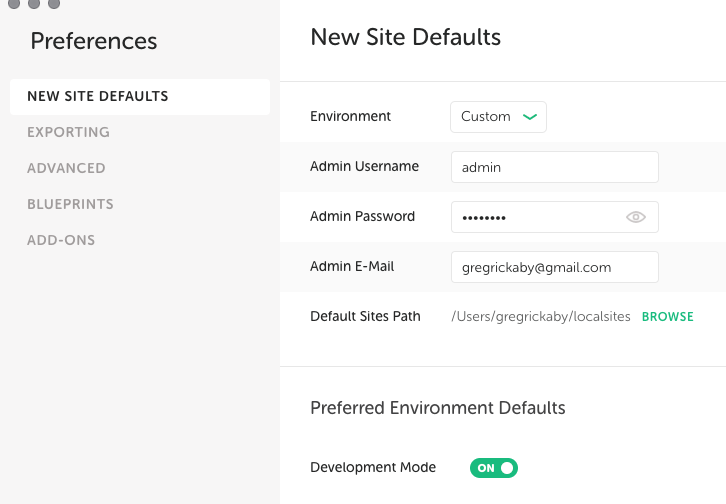
I tried using Local and loved it, but I had a problem when I was updating the CSS. The changes weren't showing up unless I cleared the cache. It became laborious to say the least and I switched back to MAMP for now. Any one else have the same issue with Flywheel? What was the solution if you did?
-
gregrickaby 8 years ago
Hey Daren! You need to enable "dev mode", which will disable the aggressive caching. https://uploads.disquscdn.com/images/48541d4f1b1f608680571d013b091b8d2723475f448db118bca53ed2bd0dc2d3.png
-
Daren 8 years ago
Thanks Greg, I'll give it a try.
-
-
-
bebizzy 8 years ago
Timely reviews since I'm looking for a dev environment for a couple of future projects. Good info.
-
Grant Palin 8 years ago
I use XAMPP on Windows 10 Pro for various webdev projects. Not really problematic, and less hassle than chasing down the components and installing them manually. Been trying to migrate some of them to run in Docker containers, so there's less stuff needing to be run locally. Still figuring it out, but I'll probably get there someday!
-
Cesar Falcao 8 years ago
Local is near perfection. I use it on Windows and Mac. I'm also a happy Flywheel customer (after using other good VPS and managed hosting options) with no downtime or problems for the last 10 months.
-
Donna McMaster 8 years ago
Thanks for the reviews! This is very timely for me as I'm finally upgrading from MacOS Yosemite (10.10) to Sierra (10.12). I've been putting it off because I dread once again going through all the Homebrew scripts, conf file edits, virtual host setup, etc. I'm definitely going to give Local a try.
-
Jonathan Bossenger 8 years ago
Yup, following in the footsteps of other open source enthusiasts like Rasmus Lerdorf, Mark Suttleworth and Richard Stallman. Linux users, making the world a better place, on repo at a time.
-
Rasmus Schultz 8 years ago
The best dev environment available for Windows today is Ubuntu on Windows, free for Win 10 by Microsoft. It's a real Ubuntu Linux environment that runs natively on your CPU, integrates with the native Windows file system, and so on. You can run the bleeding edge versions of PHP, build it from source, install PECL extensions, run native Linux tools and Bash commands via shell functions in PHP and so on. My advice is, don't even bother with Windows binaries of PHP or PECL extensions - nothing beats having full access to the real Linux software, development tools like xdebug, and a near-identical environment to that which your production servers will be running! Windows is and always will be poorly supported for PHP development, because hardly anyone deploys PHP projects to Windows servers. We have a much better option now :-)
-
Wamp multiple instances 8 years ago
WAMP is significantly better solution than XAMP. WAMP enables switching between versions of PHP, apache, mysql just by a single click (windows services will restart automatically via console script). This is a highly appreciated feature for development.
-
Rene 8 years ago
I like to use Vagrant VVV. I know it is already mentioned here but i need to make sure that VVV gets the attention it deserves:)
-
Igor Benić 8 years ago
I've tried Local by Flywheel and I loved it. I also recommend it to anyone who is just beginning with WordPress (users or developers). Easy to set it up and you can develop just in a few minutes.
-
Philip Newcomer 8 years ago
I'm the author of Pilothouse (http://www.pilothouse-app.org/), which is a free/open source CLI app for managing a Docker-based local development environment, with a focus on WordPress and Laravel development. Because everything runs in Docker containers, it leaves a very small footprint on your system. You can run WP-CLI, Composer, and Laravel Artisan commands right from your host without having to install and manage those packages on your host, and you don't need to SSH in to the Docker containers to run them, so it's very easy to use. Pilothouse has cool features like automated hosts file management, and SSL support for all local sites out-of-the-box. I'd love to see Pilothouse included in your next round of CLI-based local environments.
-
John LaBella 8 years ago
I have used Xampp but find the method to add Virtual servers (more than one web site) "interesting" it sometimes works. If all you wish to do is WordPress .. then Instant Word Press server seems to work well - (http://www.instantwp.com/) One problem I have noticed with local - you cannot specify where the installation takes place - I have a smaller boot ssd BUT that is where local sets up everything .. Big problem - for me
-
Henrique Mattos 8 years ago
I won't go through all the comments, surprisingly you have 64 at the moment and I envy will. But with so many approaches, wouldn't be nice to give Docker a try? There are so many available in Github right now (although I like to configure it my own). Just wondering.. Thanks for the comparison, though. :)
-
4pixeldroid 8 years ago
I'm not a WP dev, but our organization, The Milk Mob, has WP site which is central to our operations. Having been around for a long time, I like to mettle, so periodically I clone the site and run it locally using ServerPress to control the server. I've also used Xampp, but Serverpress is supposed to do the requisite find/replace when cloning to a new server. My problem is finding a reliable and easy way to periodically clone our site and install it locally. For awhile, All-In-One worked great for this, but as our site has become more complex, it has failed. Anybody have a favorite WP cloning tool or method they'd like to share? Thx.
-
 ianmjones 8 years ago
Umm, https://deliciousbrains.com/wp-migrate-db-pro/ and https://mergebot.com/ are pretty good. ;-)
-
pixeldroid 8 years ago
Thanks for the reply. By way of an update, and a less expensive solution than either of those, I've found that Bitnami and Updraft are a great combo to get our site cloned and running locally. For $100, Updraft has a 5-year license of their "migration" module. I also tested "Local", but I like Bitnami better. It has a bit of a load time, but after loading, it is the fastest local wordpress server of the various methods I've tested.
-
robin 7 years ago
Perhaps you hit the Import limit of All-in-One free version once your site went beyond 512 MB?
-
pixeldroid 7 years ago
I have the paid version of All-in-One. It's great when it works, but I've encountered problems with in on more than one occassion.
-
-
-
-
-
stacmv 8 years ago
Here we have such tools as not mentioned OpenServer (https://ospanel.io/) and Winginx (https://winginx.com/en/). Their features and supported versions of software are at least worth to look at. Both are for Windows though.
-
callmeisaac 8 years ago
If I read this right, you are incorrect - MAMP Pro offers an automated install of WordPress. http://documentation.mamp.info/en/MAMP-PRO-Mac/Settings/Hosts/Extras/WordPress/ Also MAMP (Pro) does come for Windows. http://downloads2.mamp.info/MAMP-PRO-WINDOWS/releases/3.3.1/MAMP\_MAMP\_PRO\_3.3.1.exe
-
djohnsmd 8 years ago
I've used AMPPS for years. Free. Runs on Windows, MacOS and Linux. Auto installer for the stack, WordPress, Joomla, Magento, and others. cPanel, MongoDB, MySQL, SQLite, phpMyAdmin, Perl, Python etc. Switch between php versions on the fly. Domain management. 1-click backups.
-
Sridhar Katakam 8 years ago
Moved from DesktopServer to Local by Flywheel to Valet+. https://medium.com/@timneutkens/introducing-valet-blazing-fast-php-development-environment-46be91604bb2 https://sridhar.blog/tag/valet/
-
Alex Mills 8 years ago
I'm a big fan of this Docker setup: https://github.com/10up/wp-local-docker/ You just check it out a copy for you project, do "docker-compose up", and you very quickly have WordPress running at localhost. Might lighter and faster than VVV.
-
Servant Electronic S 8 years ago
After fighting with Xampp, Mamp (for Windows!) and Wamp, Local by Flywheel was a BREATH OF FRESH air!! *Until* it collided with Windoze 10 and refused to update the "hosts" file. The elder '*mp?" alternatives would update "hosts" if-and-only-if I (a) disabled firewall security and webroot and (b) made the changes in 5 minutes before these evil features re-enabled themselves. "Local by Flywheel" could not. This (Windoze & 3rd party workarounds) are probably exactly the reason that there are "some kind of Linux users". Will now boot to Linux and see how far I get in the xampp, mamp, wamp kerfuffle.
-
Tonya Engst 8 years ago
Thanks... I enjoyed reading this and found it helpful!
-
2Marc A Benzakein 8 years ago
Hi Jeff, I am not sure how I missed this review since I do try to stay on top of all the press DesktopServer gets (good and bad). As the one of the principles of ServerPress, I wanted to just pop in and let you and your readers know that there's a bit more to the Premium membership beyond the 3 site limitation. I also wanted to clear up what the "3 site" limit really is. But before i do, I really do need to say that I appreciate the write-up AND the review. Also, we're big fans of Migrate DB Pro and recommend it to our customers all the time. :-) First off, the 3-site limit. It's really not a limit in that you can actually create as many sites as you want, but you ARE limited to the number of sites you can manage at one time. In other words, you can always have three sites going, but in order to create a new one, you need to delete one to make room for it. Beyond that, there are other advantages to the Premium Membership. The software included in a Premium Membership includes all updates throughout a given year as well as premium support which includes the ability to contact us to assist with deployment to a live server. Speaking of deployment, the Premium Software has a built-in deployment functionality which makes it super easy to deploy to a live site. Additionally, it includes WP-CLI installed on each site by default as a developer plugin (meaning that when you deploy, the plugin stays local and does not get shipped with the site), NGROK integration for sharing of your site across the internet through a secure tunnel (perfect for the developer who wants to show it to their client), the ability to import archives from most popular backup plugins (Duplicator, Backup Buddy, Updraft, etc), and the ability to export from a local site to a .zip archive for remote deployment or creation of blueprints (perfect for people who start out with the same theme or framework and plugins for every site), Bypass login (allows you to bypass the administrative login on local sites), Dreamweaver support, and a few other things. So, it's a ton of support (if needed) along with a bunch of features. It's true that most of these things have workarounds, but the idea is to be efficient with time and that's our focus. Anyway, I hope that helps clear a few things up and should anyone have any questions, feel free to contact me directly! You can find me on twitter (@marcbenzak) or on our contact page. :) Thanks again for the great article! We always tell people that each product has its advantage and our goal is simply to help you develop the best workflow that works FOR YOU!
-
Michael Thomas 7 years ago
Your website looks old though, makes me wonder if DS has been abandoned. The local by fly wheel site looks new and fresh, you know, flat design and all of that. Just saying.
-
robin 7 years ago
I use DS, and I like it enough to speak well of it, but it irks me that you boast that the Premium version facilitates easy migration when a free plugin like All In One Migration does this brilliantly already - so well, I can't imagine that any other method could better it lest they get it down to like 1 or 2 clicks or something. Migration should be part and parcel of any package, free or otherwise.
-
-
Nola Young 7 years ago
I have recently installed the DS 3.9 Pro version and although I am happy with the interface and quick support with them, I am plagued by speed issues. I've done everything to try and rectify this, ie. turning off antivirus, firewall, put it in airplane mode, turned off my backup, changed adjusting the minimum processor state, excluding xampp in Windows defender, changed the max_execution time on php.ini, but it's still slow and even with Internet disabled and one drive sync turned off. I've run sfc scan now and dism.exe. All good. I've turned off some windows features as well . Its actually slower than working on my website online. The point to a localhost is to speed up development I thought. I should mention I am on Windows 10, core i5, 12GB, 1T SATA. In my research the main advice is SSD (of course) and Not Windows 10 because of bloatness and notorious for background services. I don't have much choice, just bought this new Win 10 machine. Getting back to the core discussion by the author, does anyone know which one of these Dev Environements is the fastest??? Or are they all just slow as molasses? Whereby I just don't get it.
-
2djWilliamWiLD 7 years ago
For me DesktopServer 3.9.0 (Release Candidate with php 7.X : $74.96) + Duplicator Pro (79$) is the most efficient and affordable couple... If you add codekit3 (34$) to the stack you can go further in theme development (and compile scss, mirror on ios etc...) All other dev environment workflow are not "invalid" just more "expensive"...
-
Seagyn Davis 7 years ago
The free All-in-One WP Migration does a stellar job.
-
robin 7 years ago
Agreed. The All In One Migration tool ended my search for a migration plugin that didn't require knowledge of DBs or FTP or anything. Just upload the file to your WP site from the DASHBOARD. Beats the rest by a long margin because it is so easy to do. Duplicator Pro still needs a pile of other actions and knowledge to get the job done. AIO does it in a couple of clicks. No brainer.
-
-
-
Helmut 7 years ago
Nice review, but the only thing that sucks is: I cannot install local by flywheel on my laptop. It is just not finishing.
-
Helmut 7 years ago
Nice review but I cannot install local by flywheel on my laptop. It is just never finishing. Such a pitty.
-
1Jesse James Matos Soares 7 years ago
kkkk. To you is odd to say Shamp, to me is odd to say zamp, because Shamp is the natural sound of XAmp in Portuguese.
-
Marc 7 years ago
Thank you Jeff! I was reading your article because I have a problem with MAMP Pro. SymLink is not working. I've checked the FollowSymLink in Apache section, but I still get a 403 forbidden error. Is checking this box all you need to do to get FollowSymLink working or is there more?
-
Phil Braun 7 years ago
Quick note: after an update left Valet+ unable to start, and then having to spend a few hours getting the far too many spinning wheels needed for it to somehow magically realign, I've switched back to Mamp Pro, and for the last week or so have been quite happy using it. The current Mamp Pro 5.2.x is almost as fast as Valet+ in WP backend, quite a bit faster than Local by Flywheel, it uses less RAM and CPU than both (significantly less so than LbF), so I currently tend to disagree with the Authors comment of "slow as molasses" in the review above.
-
UT4UTC 6 years ago
How about Vagrant?
-
1John Dorner 5 years ago
I've been using Laragon for the past year on Windows and have been very impressed with it. Definitely worth exploring if you are using Windows - no Mac or Linux version available. It doesn't come with WP-CLI, but it is two steps to install and the it is available from any terminal window - including phpStorm's terminal. I used to use XAMPP and found the Windows version of Local never installed as easily as it should have. Desktop Server is great too!
-
 Ram Maurya 5 years ago
WP-CLI is something I can't live without personally but as long as it can be installed, I don't see any problems there. Local's "Lightning" update has made things quite fast, I wonder how it would compare with Laragon.
-
-
1luroch 5 years ago
Have you tried running WP using Parallels Desktop VM?
-
Ram Maurya 5 years ago
Not really. If you have, what's your experience like?
-
-
1Big John 5 years ago
I found MAMP buggy when I first updated to Catalina and could never get it working again. I've since moved to Valet which is perfect for my needs (I do a lot of Laravel and Craft in addition to WordPress). On Windows I found Laragon to be exceptional. It is the one thing I miss about moving back to a Mac.
-
Ram Maurya 5 years ago
Valet is something I'm looking forward to trying in near future too, been hearing nice things about it.
-
-
1Gravnetic 5 years ago
Some seeminly simple things like finding where PHP is installed on Local can melt you mind...it took me 2 hours to set up VSCode to use Local on Windows. Anyone else have this issue or have a best setup.
-
Ram Maurya 5 years ago
I don't recall any problems setting up Local on Window. The ini files are easily accessible inside each site's working directly. Finding PHP installation path did confuse me, but if you open up Site shell and enter
where php, it should point you to the right path. Did you have any specific issues?
-
-
1Lorenzo Piccinini 5 years ago
https://laragon.org/ Laragon for me is the the best localhost webserver without any doubt (for windows)
-
Ram Maurya 5 years ago
Interesting…many of you seem to recommend Laragon, I might give it a shot at some point.
-
-
1maroberto1 5 years ago
Hi, thanks for this, have you experienced any issues with local and db migrate pro? I normally use mamp but used local for first time recently and got some ajax errors pushing the theme to a remote server (database was OK), of course these errors may not be down to local could be plugins etc but just wondered if you knew of anything that might be a problem such as the way local stores the sites in a app folder?
-
Ram Maurya 5 years ago
Hey! Not really, I've been using Local myself recently and don't have any issues running the plugin. If you're seeing any issues, please reach us via support.
-
-
mocha_musi 5 years ago
Local is dope! The best dev environment for wordpress plugins and themes by far IMO.
-
1Benjamin J 5 years ago
I like to use WAMP Server for Windows because it's easy to configure the advanced settings for the applications. I can launch a WP site on local in about 4mins. I'm very happy with it and I think you should include it in your next review.
-
Ram Maurya 5 years ago
Thanks for sharing that, Benjamin. Setting up a site in Local usually takes 60-90 seconds for me, and using the site feels fast too. Hook that up with a blueprint, and it can install things even faster. I might do a review for Windows only applications soon, and I'll be sure to include WAMP in the process.
-
-
DJ 5 years ago
I've been using AMPPS for years. I like that it runs on all of Windows, MacOS and Linux; I can change php versions on the fly and use perl etc. It's fast, has a good cPanel and all the tools we tend to like such as phpAdmin and 1-click installs for WordPress.
-
1Ryan Robillard 5 years ago
The issue I've had with DesktopServer and Local are that they require admin rights to run and in a corporate environment where designers and developers don't usually have the permanent admin rights, this is a showstopper.
-
Ram Maurya 5 years ago
Not quite sure what all DesktopServer does behind the scenes but Local usually needs to update /etc/hosts file for the custom domains to work.
-
-
1Kirk 5 years ago
Another really useful article... Many thanks! Desktop Server has caused me major headaches for the 2 years that I used it. Many times when migrating between local and remote copies, my URL's would get messed up. I've recently discovered Laragon for Window, which has taken all my problems away. I only use Windows at Home and use Mac at the Office. I've tried Local by Flywheel on my Mac, but Migrate DB Pro constantly errors for me with Local by Flywheel, which caused me to reluctantly move back to Desktop Server. Desktop Server could at least complete a migration from remote to local, but it still regularly messes up my URL's. I've started using MAMP Pro since reading this article and I finally have a solution for Mac that works well.
-
Ram Maurya 5 years ago
Good to hear that, Kirk. I too use MAMP Pro myself, as well as Local for quick playgrounds.
-
-
Oscar Romero 5 years ago
Another option I am using is devilbox (docker): https://github.com/devilbox
-
Vlad Nikolskiy 5 years ago
Many thanks for information about these tools and instructions how to use. Very helpful article.
-
Zack Wallace 5 years ago
I'll add my vote for Laragon. It presents itself as a "small" app with a simple interface and system tray icon. One click gets you an interface where you can open the DB, open terminal, open the web root folder, open local hosts file (Windows), etc. It's great for tinkerers as you can create little auto-installers and scripts and mess with a lot of the defaults and config files. It can intercept emails so that any outgoing emails from any app is captured and opened in a text file. It can do SSL with a local certificate. One-click apps defaulting with WordPress, Drupal, and Laravel, but you can create more. Really anything Apache/MySQL/PHP runs in here. Just by adding a new folder to the web root, the app will detect it and automatically set up your local hosts file domain for it. You can change and add PHP versions pretty easy, edit the php.ini file, check error logs, Apache configuration, and even edit the sites-enabled files for each domain/project. I've used XAMP, WAMP, Local, VVV, Vagrant, and even Bitnami standalone servers, and Docker, but Laragon stands out for minimalism, simplicity, and solid automatic features.
-
John Swaringen 5 years ago
Thanks for this article. I've wanted to do local development for a while, but found it to be too hard to configure.
-
Mike 5 years ago
Please don't recommend WP tools that are not open source, when OS options exist. WP is only what it is due to the open source and community. It's disrespectful to the OS movement and WP community, and detrimental to the long-term. To everyone here. please do not use Local. Ignore this recommendation. All the others listed are open source. If we don't support OS, how can we justifiably use WP?
-
Kevin Bauman 5 years ago
Wanting to setup a local WordPress environment on a Mac for someone else, I revisited this article. I decided to try Local, but ended up frustrated. I don't want to create a new website, I want to work on an existing one, that has a Git repository. Local makes this difficult, unless you only have the theme in the repo.
Next I tried just setting up a LAMP stack and ran into never ending MySql errors, regardless of how I installed MySql or MariaDB. Finally, I set up MAMP. It was super easy, and worked. I should have done that initially, rather waste an entire Friday afternoon trying other alternatives.
That said, my Windows machine with WSL makes setting up a LAMP stack super easy. Windows and WSL, or a Linux setup is my preference for development now days.
-
1James Joseph Finn 4 years ago
What if you want to local dev the same site on your desktop and laptop? (I use LocalWP.) Sure git can sync /wp-content easily enough, but what about the db? It seems the only solutions to sync db are manual.
-
jack 4 years ago
The plugin I made to the fish site works fine, I worked with mysql
-
-
Tim 3 years ago
Just a heads up DesktopServer has been discontinued, and Local has gone downhill fast, I have spent a few days trying to get it up and running. You can’t use anything above PHP 8.0.0 (they have been promising an update for a long time), if on windows using Apache you must have it installed on drive C, and any sites you add must be on Drive C for it to work. It just gives of the impression it been kicked into that pile of projects you need to maintain that you’re not really interested in any more, then eventually it just dies.
-
Sunny 2 years ago
Thank you for sharing such nice article. I'd like to recommend ServBay, an 'all in one' tool. It saves web developers a significant amount of time in maintaining their development environments. It's suitable for web developers such as Webserver, PHP, MariaDB, PostgreSQL, etc.
-
Thomas Weidman 2 years ago
I've been a long time user of ddev. https://ddev.readthedocs.io/
Works well for WordPress and many other stacks as well. It makes it extremely easy to have a complex set of containers to integrate many services into a local development environment with easy setup for team members.